YouTube Studio’s New Insights Tab: Where Analytics Went, What Changed, and What It Still Won’t Show You
By The iamcreator.io Team · November 12, 2026
If you opened YouTube Studio this month and the Analytics tab was gone, nothing broke and nothing was deleted. YouTube renamed it Insights, regrouped the reports, and moved a few controls one click deeper. Your data is the same. Finding it is what changed.
Short answer
Where did Analytics go in YouTube Studio?
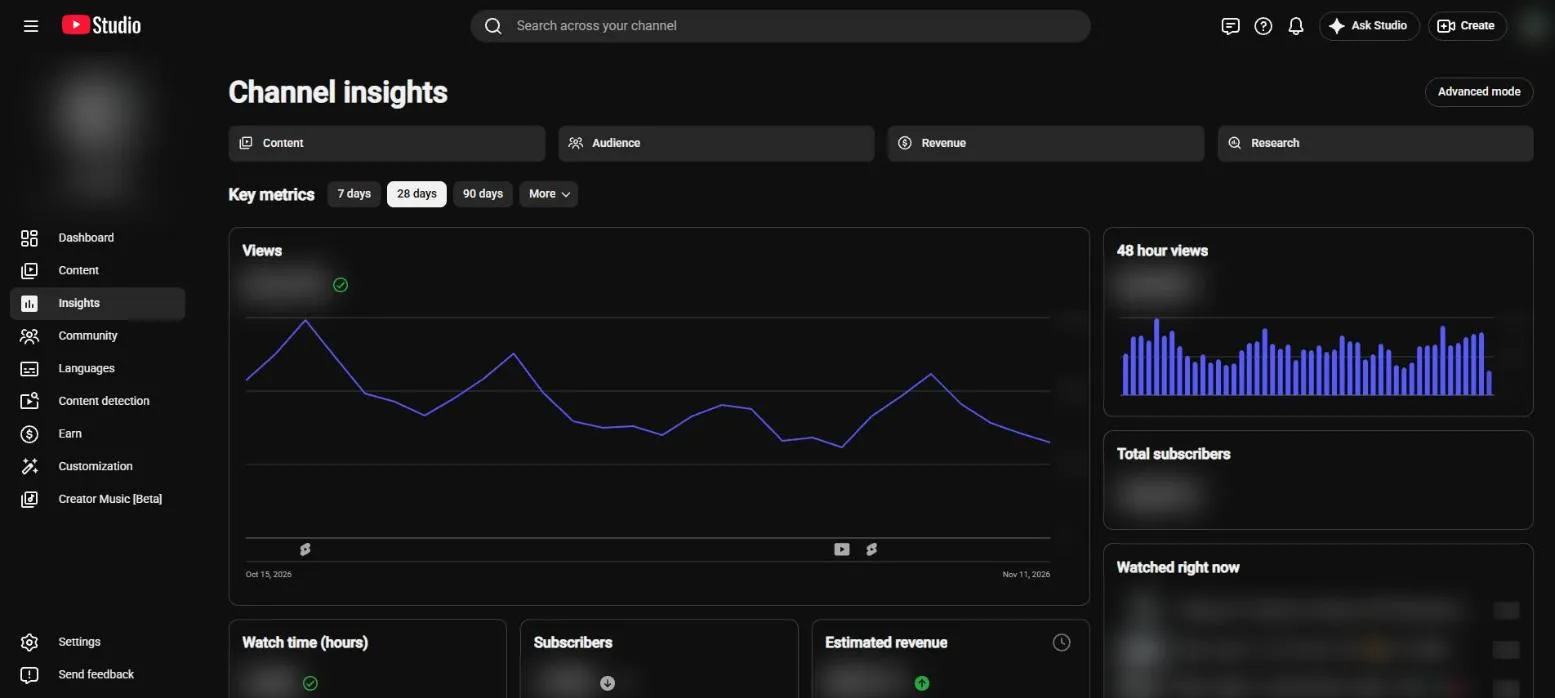
It’s the same item in the left menu, renamed. YouTube started testing the change with a small group of creators on July 16, 2026, and since early November it has been reaching far more channels, usually announced with a pop-up about the updated Analytics experience. YouTube’s own help pages now say the Analytics page has been updated to the Insights page on desktop.
The rename goes further than the menu. The bar-chart icon you hover over on the Content page now says Insights too. So when a tutorial tells you to “open Analytics,” read it as “open Insights.” Every step after that works the same, including the per-video route to your likes and dislikes.
What changed in the new YouTube Studio layout
| Before | In the new Studio |
|---|---|
| Analytics in the left menu | Insights, on the menu and on the per-video icon |
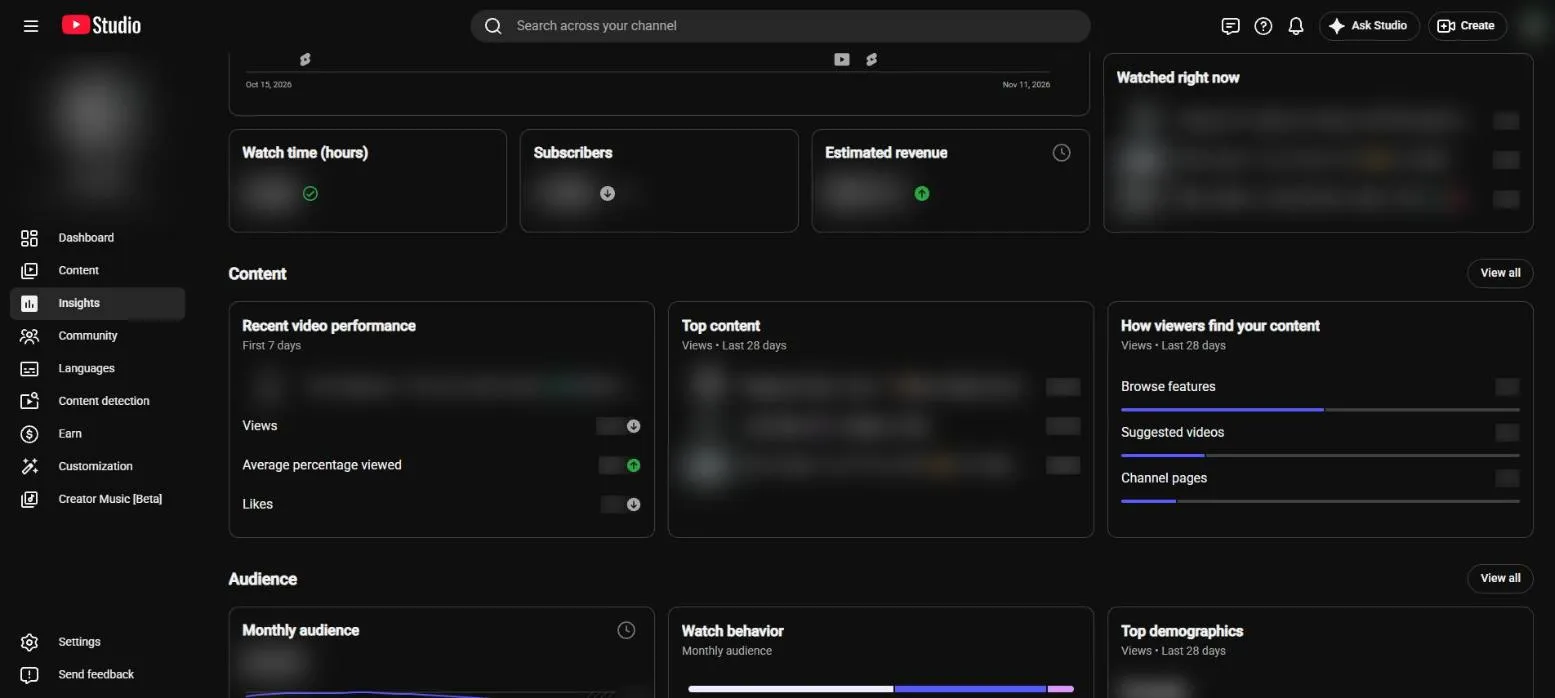
| One long scroll of separate cards | Key metrics on top, then grouped Content, Audience and Revenue sections, each with a “View all” link |
| Custom dates right in the overview’s date menu | 7, 28 and 90 days, plus a More menu with 365 days, Lifetime, single years and single months. Custom ranges live in Advanced mode |
| A realtime card for the last 48 hours | 48 hour views and Watched right now, top right |
| Trends tab | Research tab: outlier videos in your niche and title patterns |
| Saved keywords on desktop | Retired on desktop. Still in the Studio mobile app, with a CSV download from your Research notification |
| Nothing | Four AI summary cards (Channel Summary, Content Patterns, Audience Loyalty, Video Summary), only on channels with Ask Studio access |
The detail now sits on the sub-pages. The Content page, for example, splits Videos, Shorts, Posts and Playlists, and for Shorts it shows how many viewers stayed to watch versus swiped away.
Why don’t I have YouTube Studio Insights yet?
Because it’s rolling out gradually, channel by channel. The comments under creator videos about the update are full of people saying it hasn’t reached them yet, from Canada to Denmark. What to know while you wait:
- It’s desktop only. The rename is for Studio on a computer. The mobile app keeps its own simpler view.
- It goes by channel, not by country. Two channels in the same country can see different versions for weeks.
- The AI cards are a second gate. They only appear on channels that also have Ask Studio access, so plenty of channels get the new layout without them. The channel we checked for this post did: new layout, no AI cards.
- You can’t opt in. We haven’t found any setting that switches it on early.
How to get the old YouTube Analytics view back
There’s no toggle that brings back the old overview. The closest thing is Advanced mode, the same detailed report you had before:
- Open
studio.youtube.comand click Insights in the left menu. - Click Advanced mode in the top-right corner, or click any chart or metric card.
- Pick your metrics, add a comparison or export, exactly as before.
- Use the new back button to return to the overview.
How to set a custom date range in Insights
The overview offers 7, 28 and 90 days. Its More menu adds 365 days, Lifetime, single years and single months. For anything else, like the last 14 days or one launch week, open Advanced mode and set the dates there. The last item in the More menu is a shortcut straight into it.
The Research tab replaced Trends (and saved keywords)
The old Trends tab is now Research: a page of videos that are working in your niche. Each one shows its channel’s subscriber count, its views, its age and an outlier multiplier, which is how far the video beat that channel’s usual numbers. The highest label we saw was 100x, so read it as “100x or more.”
Filters switch between Shorts and long videos and narrow the list to Outliers in my niche, What my viewers watched or Recent uploads in my niche. An Analyze title patterns button looks for what the winning titles have in common.
To make room, YouTube retired saved keywords on desktop. Your list is still in the Studio mobile app, and YouTube said you can download it as a CSV through the link in your Research notification for three months. If the list matters to you, don’t wait.
One caveat from creators: YouTube decides what “my niche” means, and it isn’t always right. Some report seeing videos from niches they have nothing to do with. Use Research for ideas, not as a verdict on what your audience wants.
What creators think of the new Studio
We read the comments under the most-watched videos about the update, in English and German. Four themes kept coming up:
- “It’s not showing up for me.” By far the most common comment. See the rollout section above.
- “Why change something that works?” The sharpest complaints are about losing the choice. Creators wish they could keep the old layout, and some call the new one a downgrade.
- “Not old-timer friendly.” Long-time creators knew where everything was. The reports they used every day now sit one click deeper, in Advanced mode.
- “Isn’t it just a new name?” Mostly, yes. The data is the same. The grouping, the shortcuts and the Research tab are what’s new.
On the positive side, creators who mostly check the overview say it reads faster, and the creators covering the update are most excited about Research: outliers from channels your size are easier to learn from than a big creator’s hits.
What the new Insights still doesn’t show you
The redesign makes Studio easier to glance at. It doesn’t change what Studio is: a record of what already happened. The three questions small channels ask most still take a hunt, or an outside tool:
- When will I get monetized at this pace? Your Partner Program progress sits in the separate Earn tab, and it shows where you stand, not when you’ll get there.
- Was this video good for my channel? Top content ranks by views, which always favors whatever went viral, not the uploads that beat your own usual.
- What should I fix this week? The AI cards try to answer this, but only on channels with Ask Studio access, and AI that learns from your history has the least to go on when your channel is small. We tested that in YouTube Studio’s AI tools and small channels.
Full disclosure
New YouTube Studio Insights vs iamcreator.io
The quick version, feature by feature:
| Feature | YouTube Studio | iamcreator.io |
|---|---|---|
| Free to use | Yes | YesFree plan |
| Your official YouTube numbers | Yes | Yes |
| Partner Program progress | YesEarn tab | Yes |
| Custom date range on the main screen | NoAdvanced mode only | Yes |
| Change vs the previous period on every headline stat | PartlyUp and down icons | Yes |
| Projected monetization date | No | YesPro |
| Step-by-step monetization roadmap | No | Yes |
| Weekly report with what to fix | No | Yes |
| AI read of your channel | PartlyAsk Studio channels only | Yes |
| Every video scored against your own average | PartlyNew uploads vs recent ones | Yes |
| Likes in your video list | NoRemoved in 2026 | Yes |
| Upload consistency calendar | No | Yes |
| Channel health check | No | Yes |
| Look up any public channel | No | YesFree channel analyzer |
| Realtime views | Yes | No |
| Outlier videos in your niche | YesResearch tab | No |
| Title and thumbnail A/B tests | Yes | No |
A check means it’s built in, a cross means it isn’t, and a dash means partly, with the catch noted under it.
Side by side, in detail
| YouTube Studio Insights | iamcreator.io | |
|---|---|---|
| Price | Free | Free plan; Pro $5 a month or $50 a year |
| Custom date range | Only in Advanced mode | On the dashboard, next to 7, 28, 90 and 365-day presets |
| Change vs the previous period | Icons for higher or lower than usual; exact comparisons in Advanced mode | A percentage change on every headline stat |
| Partner Program progress | Separate Earn tab, not in Insights | Countdown on the dashboard for the watch-hours and Shorts paths |
| When you’ll qualify | Not shown | Projected date at your recent pace (Pro) |
| What to do next | AI cards, if your channel has Ask Studio | Monetization roadmap with your current stage and next step, free |
| Weekly summary | AI Channel Summary card, if your channel has Ask Studio | Weekly report: what moved, best and weakest video, what to fix |
| Was a video good for your channel? | Top content, ranked by views | Value Score on every video, against your own catalog |
| Likes in your video list | Removed from the Content list in 2026 | On every video card, next to comments |
| Upload consistency | Not shown | Publishing calendar on the dashboard |
| Realtime | 48 hour views and Watched right now | Not realtime; on-demand refresh on Pro |
| Outliers in your niche | Research tab, its strongest new feature | Not built in; the free channel analyzer looks up any public channel |
| Title and thumbnail A/B tests | Built in (Test & Compare) | None |
iamcreator.io reads the same YouTube data Studio does, from the channel you connect, so the numbers match. It doesn’t replace Studio. It puts the numbers a growing channel checks most on one screen, with no Advanced mode in between.
Which one to open for which question
| Your question | Where to look |
|---|---|
| How did my last upload do in its first week? | Studio: Insights, Recent video performance |
| What’s working in my niche right now? | Studio: Insights, Research |
| How are my numbers over a custom range, at a glance? | iamcreator.io dashboard, or Advanced mode in Studio |
| Which of my videos beat my own average? | iamcreator.io Value Score |
| When will I reach monetization at this pace? | iamcreator.io countdown |
| What should I fix this week? | iamcreator.io weekly report |
Still working out which numbers YouTube counts toward monetization? See how to check your watch hours and the full YouTube Studio vs vidIQ comparison.
See your whole channel on one screen
Connect your channel: custom date ranges, your monetization countdown and every video ranked against your own average, no Advanced mode needed.
The short version
- Analytics wasn’t removed. On desktop Studio it’s now called Insights, and the per-video icon says Insights too.
- Detailed reports and custom date ranges live in Advanced mode, top right. There’s no switch back to the old overview.
- Trends became Research, and saved keywords left desktop. Export them if you need them.
- It’s rolling out channel by channel, and the AI cards need Ask Studio access on top of that.
- For what Studio still doesn’t answer, like your monetization date and which videos beat your own average, there’s iamcreator.io.
Frequently asked questions
Where did Analytics go in YouTube Studio?
It was renamed Insights. On desktop Studio, the Analytics item in the left menu now says Insights, and the bar-chart icon you hover over on the Content page says Insights too. The data is the same. The reports are grouped differently, and the detailed view lives behind the Advanced mode button in the top-right corner.
Why does my YouTube Studio look different?
YouTube is rolling out a redesigned Studio. It started as a test with a small group of creators on July 16, 2026 and began reaching far more channels in early November 2026. Analytics became Insights, the reports were grouped into Content, Audience and Revenue sections, and the Trends tab became Research.
How do I get the old YouTube Studio analytics back?
There’s no setting that switches back to the old overview. The closest thing is Advanced mode: open Insights and click Advanced mode in the top-right corner, or click any chart or metric card. It’s the same detailed report as before, with custom date ranges, comparisons and export.
How do I set a custom date range in YouTube Studio Insights?
The Insights overview only offers 7, 28 and 90 days, plus a More menu with 365 days, Lifetime, single years and single months. For any other range, open Advanced mode (top-right corner, or the last item in the More menu) and set the dates there.
Why don’t I have YouTube Studio Insights yet?
It’s rolling out gradually, channel by channel, and only on desktop. Channels in the same country can see different versions for weeks. The AI summary cards are a second gate: they only appear on channels that also have Ask Studio access.
What happened to the Trends tab and saved keywords?
Trends became the Research tab, which shows videos that outperform their channel’s usual numbers in your niche. Saved keywords were retired on desktop. They’re still in the Studio mobile app, and YouTube offered a CSV download through the link in your Research notification for three months.